
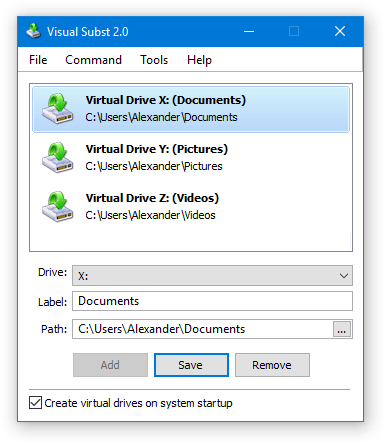
Every active computer user often finds themselves navigating deep into system structures to access frequently used folders, such as C:\Users\Name\Documents\Projects\2026\Active_Task. This repetitive process can be time-consuming and frustrating. Visual Subst offers an elegant solution by allowing users to associate these deeply nested directories with virtual drive letters.
This intuitive utility simplifies file access by creating virtual drives that behave like physical drives, making it much easier to reach your most important project folders or system locations. It provides a graphical user interface (GUI) to manage these virtual drives, overcoming the limitations of the built-in subst command in Windows and significantly streamlining your workflow.
In This Post
System Specifications
Minimum
- OS: Windows 7
- RAM: 2 GB
- Disk Space: 200 MB
Recommended
- RAM: 4 GB
Technical Details
| Software Name | Visual Subst |
|---|---|
| Version | 6.0 |
| License | Freemium |
| File Size | 3 MB |
| OS Support | Windows |
| Language | Multi-language |
| Developer | NTWind Software |
| Homepage | https://www.ntwind.com/software/visual-subst.html |
| Changelogurl | https://www.ntwind.com/software/visual-subst/whats-new.html |
| Last Updated | March 3, 2025 |
Key Features
- Virtual Drive Creation: Visual Subst allows you to easily create virtual drives from any local directory or network share, mapping long, complex paths to a single drive letter for quick access.
- Graphical User Interface (GUI): Unlike the command-line subst utility, Visual Subst provides a clean, simple, and distraction-free graphical interface for effortless creation, editing, and removal of virtual drives.
- Editable Drive Labels: Define and customize labels for your virtual drives, making them more descriptive and easier to identify within Windows Explorer, a feature not available with the native subst command.
- Persistent Drives After Reboot: Visual Subst automatically saves the list of your virtual drives and restores them upon system startup, ensuring your mapped folders are always available without manual intervention.
- UAC Support for Elevated Applications: The software seamlessly creates virtual drives that are accessible by elevated applications, addressing a common limitation where subst drives are invisible to programs run as administrator.
- Recycle Bin for Virtual Drives: Manage deleted items from your virtual drives with a dedicated Recycle Bin feature, providing an extra layer of safety and convenience for your mapped folders.
- Portable Operation: Visual Subst is designed to be fully portable, storing all its settings in an INI file, which means it doesn’t require installation and can be run from a USB drive.
Installation Guide
Installation Steps
- Click the download button above to get the installer for Visual Subst.
- Locate the downloaded executable file (VSubst.exe) and double-click to run it.
- Follow the on-screen instructions to complete the installation process. Alternatively, as a portable application, you can simply extract the contents of the ZIP file to a desired location and run the executable directly.
Compatibility: Compatible with Windows 7, 8, 10, and 11.
Problem Solving
- Issue: Virtual drives not appearing for elevated applications → Solution: Ensure the UAC Drive feature is enabled within Visual Subst settings.
- Issue: Drives not restored after reboot → Solution: Verify that Visual Subst is configured to run on system startup and save drive lists.

Discover more from Softwares Wave
Subscribe to get the latest posts sent to your email.